# WordPress

# Backup / Migration


# WP Resources

[https://my.siteground.com](https://my.siteground.com) Main Server for websites

<a class="sg-link sg-with-color sg-typography sg-typography--break-all" data-component="link" data-e2e="link" role="link" tabindex="0">themes.webmarketers.ca</a> Default WP Install

# Custom Navigation

# **Clean Custom Menu**

### Description

This function generates a clean custom menu based on the WordPress menu system. It uses the `get_nav_menu_locations` and `wp_get_nav_menu_items` functions to retrieve the menu items and their respective locations.

### Code

```php
function clean_custom_menu( $theme_location ) {
    if ( ($theme_location) && ($locations = get_nav_menu_locations()) && isset($locations[$theme_location]) ) {
        // MAIN MENU CLASSES
        $ul_class = 'main-nav';
        $li_class = 'item';
        $link_class = 'link_class';

        // SUB-MENU CLASSES
        $ul_submenu_class = 'sub-menu';
        $li_submenu_class = 'item';
        $link_submenu_class = 'submenu_link';

        $menu = get_term( $locations[$theme_location], 'nav_menu' );
        $menu_items = wp_get_nav_menu_items($menu->term_id);

        $menu_list = '<nav>' ."\n";
        $menu_list .= '<ul class="'.$ul_class.'">' ."\n";
        $count = 0;
        $submenu = false;

        foreach( $menu_items as $menu_item ) {
            $link = $menu_item->url;
            $title = $menu_item->title;

            if ( !$menu_item->menu_item_parent ) {
                $parent_id = $menu_item->ID;
                $menu_list .= '<li class "'.$li_class.'">' ."\n";
                $menu_list .= '<a href="'.$link.'" class="'.$link_class.'">'.$title.'</a>' ."\n";
            }

            if ( $parent_id == $menu_item->menu_item_parent ) {
                if ( !$submenu ) {
                    $submenu = true;
                    $menu_list .= '<ul class="'.$ul_submenu_class.'">' ."\n";
                }
                $menu_list .= '<li class="'.$li_submenu_class.'">' ."\n";
                $menu_list .= '<a href="'.$link.'" class="'.$link_submenu_class.'">'.$title.'</a>' ."\n";
                $menu_list .= '</li>' ."\n";
                if ( $menu_items[ $count + 1 ]->menu_item_parent != $parent_id && $submenu ){
                    $menu_list .= '</ul>' ."\n";
                    $submenu = false;
                }
            }

            if ( $menu_items[ $count + 1 ]->menu_item_parent != $parent_id ) {
                $menu_list .= '</li>' ."\n";
                $submenu = false;
            }
            $count++;
        }
        $menu_list .= '</ul>' ."\n";
        $menu_list .= '</nav>' ."\n";
    } else {
        $menu_list = '<!-- no menu defined in location "'.$theme_location.'" -->';
    }
    echo $menu_list;
}

```

### Usage

To use this function, simply call it and pass the theme location as an argument:

```php
clean_custom_menu('menu-1');

```

Make sure to define the `register_nav_menus` function in your theme's `functions.php` file:

```php
register_nav_menus(
    array(
        'menu-1' => esc_html__( 'Primary', 'fatboys' ),
    )
);

```

# **Custom Menu (Not-Preferred Method)**

### Description

This function generates a custom menu based on the WordPress menu system. It uses the `wp_get_nav_menu_object` and `wp_get_nav_menu_items` functions to retrieve the menu items.

### Code

```php
function clean_custom_menus() {
    $menu_name = 'primary'; // specify custom menu name
    if (($locations = get_nav_menu_locations()) && isset($locations[$menu_name])) {
        $menu = wp_get_nav_menu_object($locations[$menu_name]);
        $menu_items = wp_get_nav_menu_items($menu->term_id);

        $menu_list .= "\t\t\t\t". '<ul class="navbar-nav mb-2 mb-lg-0 mt-lg-4 ms-auto">' ."\n";
        foreach ((array) $menu_items as $key => $menu_item) {
            $title = $menu_item->title;
            $url = $menu_item->url;
            $menu_list .= "\t\t\t\t\t". '<li class="nav-item px-lg-1 mt-0 mb-0 mt-lg-0 mx-lg-1"><a class="nav-link my-auto" href="'. $url .'">'. $title .'</a></li>' ."\n";
        }
        $menu_list .= "\t\t\t\t". '</ul>' ."\n";
    } else {
        // $menu_list = '<!-- no list defined -->';
    }
    echo $menu_list;
}

```

# Blog Pages


# Blog Pages URL Editing and Old Blog Pages Redirection

If you wanna change old blog url format (**url/\[year\]/\[month\]/\[post-name\])** to the SEO friendly format (**url/blog/\[post-name\])**

First of all, you need to change the permalink settings to the following: (Settings/Permalink)

[![Screenshot 2024-10-22 at 1.21.10 PM.png](https://bookstack.webmarketersdev.ca/uploads/images/gallery/2024-10/scaled-1680-/screenshot-2024-10-22-at-1-21-10-pm.png)](https://bookstack.webmarketersdev.ca/uploads/images/gallery/2024-10/screenshot-2024-10-22-at-1-21-10-pm.png)
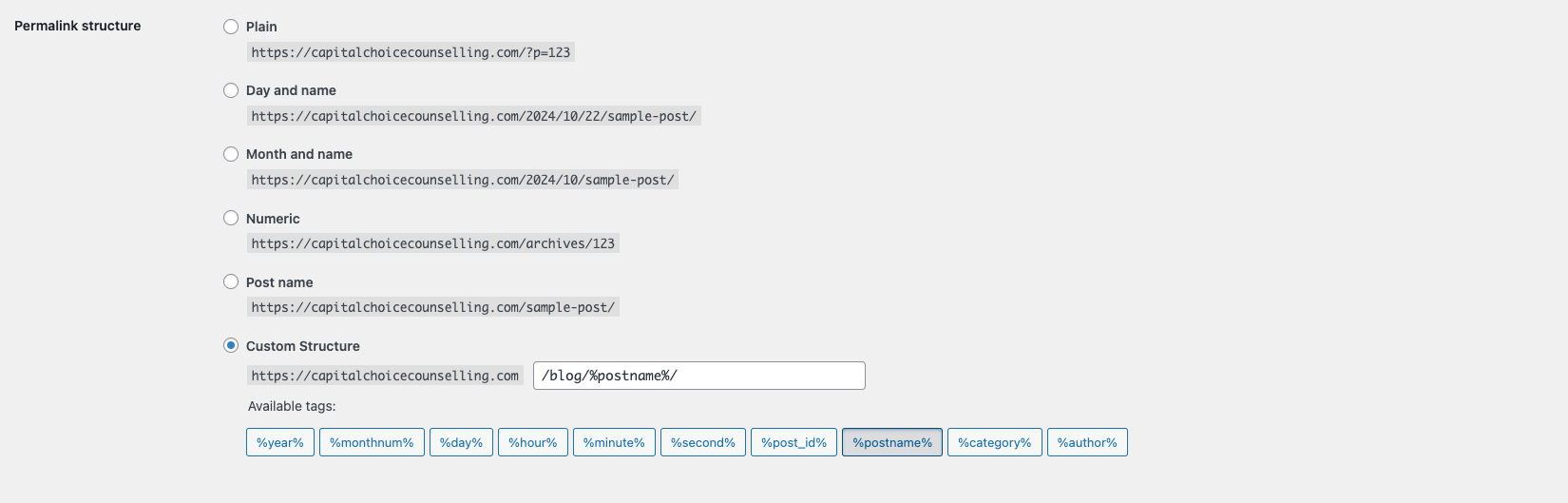
#### <span style="background-color: rgb(53, 152, 219); color: rgb(255, 255, 255);">!!Please remember to add "/blog/%postname%/" to the custom structure.</span>

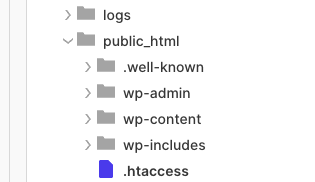
<span style="color: #000000;">Add the following codes to the .htaccess file located in the following directory:</span>

```
RedirectMatch 301 ^/[0-9]{4}/[0-9]{2}/(.*)$ /blog/$1
```

<span style="color: #000000;">[![Screenshot 2024-10-22 at 1.24.49 PM.png](https://bookstack.webmarketersdev.ca/uploads/images/gallery/2024-10/scaled-1680-/screenshot-2024-10-22-at-1-24-49-pm.png)](https://bookstack.webmarketersdev.ca/uploads/images/gallery/2024-10/screenshot-2024-10-22-at-1-24-49-pm.png)</span>

<span style="color: #000000;">Save it</span>

<span style="color: #000000;">Don't forget to check the old link and ensure that it redirects to the new URL.</span>